Posted by:
Admin
Date:
January 19, 2026
Category:
blogs
Making Tax Digital Explained: All of What UK Businesses Need to Know
Making Tax Digital (MTD) is a programme by the government through HMRC to transform the way organisations and individuals deal with their taxes. Introduced as a component of a bigger shift to digitalise the UK tax system, MTD is expected to lessen mistakes, enhance precision, and simplify tax reporting by using authorised digital software. If you are a VAT-registered business, a self-employed sole trader or a landlord receiving rental income, MTD is expected to impact the way you declare your tax returns and keep financial records. This blog covers all about Making Tax Digital HMRC.
Understanding Making Tax Digital
Making Tax Digital (MTD) is an essential change in the system of tax reporting and handling in the UK. Instead of the current system based on annual returns and manual record keeping, It will bring an era of continuous digital reporting. This will allow HMRC to:
- Get tax information in near real time
- Detect discrepancies
- Reduce the burden of last-minute filings
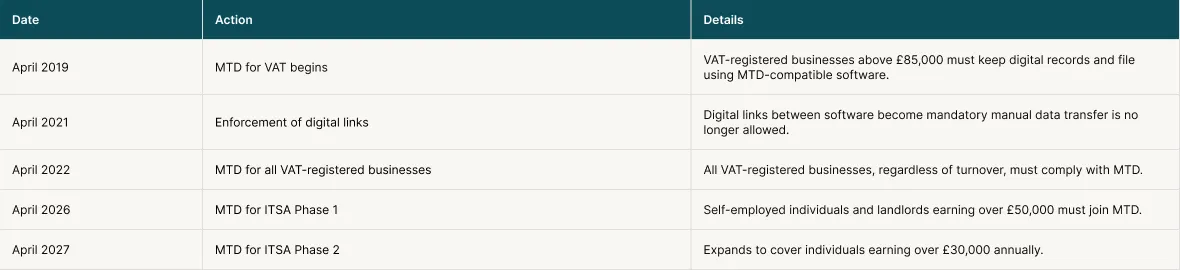
Making Tax Digital for VAT was the first step in this direction. Now, it is expanding to income tax and finally, corporation tax.
“Making Tax Digital (MTD), an initiative announced in 2015 by MP George Osborne in his autumn statement, brings with it the most impactful change to the UK tax administration for a generation. The Making Tax Digital vision aims to revolutionise the way businesses, landlords, individuals, and tax accountants interact with Her Majesty’s Revenue and Customs (HMRC).”
Sadiq
What is HMRC doing to help with Making Tax Digital? The Making Tax Digital toolkit
HMRC is determined to assist you regardless of being a landlord or a letting agent. HMRC launched the Making Tax Digital toolkit for landlords and agents to further help you. This toolkit contains:- Tailored advice
- Examples
- Checklist
Who needs to comply with Making Tax Digital?
Since the HMRC is rolling out MTD in steps, it is important to know if you will have to comply with it. If you do, you need to know the starting dates and how to prepare. Here is when you need to comply:- You are a sole trader or a landlord registered for Self Assessment
- Your income is from self-employment, property, or both
- You earn more than £20,000 in your qualifying income
Making Tax Digital starting dates
Your qualifying date depends on how much your income was for the tax years. Here is a detailed insight:- Your MTD start date is between 6 April 2026 if your qualifying income in the previous tax year (2024-2025) was more than 50,000.
- Your MTD start date is on or after 6 April 2027 if your qualifying income in tax year 2025-2026 is more than 30,000.
- If your qualifying income is planned to be over £20,000 in tax year 2026-2027, your Making Tax Digital start date will be decided later on.
| Tax Year | Qualifying Income Threshold | MTD Start Date |
|---|---|---|
| 2024 to 2025 | Over £50,000 | From 6 April 2026 |
| 2025 to 2026 | Over £30,000 | From 6 April 2027 |
| 2026 to 2027 (planned) | Over £20,000 (legislation pending) | TBC |
You don’t have to use Making Tax Digital for income tax until you have submitted the relevant year’s Self Assessment. Early sign-up is encouraged by the HMRC.
Landlords and business partnerships
Landlords have to follow the above-described timeline based on their rental income. As for business partnerships, HMRC will decide a date later for their joining.Exemption from Making Tax Digital for income tax
You don’t have to follow MTD for income tax rules in the following cases:- Your qualifying income is less than £20,000
- You are automatically exempted, i.e., it is not practical to use electronics, or you belong to some religion that does not allow electronic devices
- You requested HMRC for an exemption and they granted it
How to Check If You Need to Use MTD for Income Tax
HMRC reviews your Self Assessment returns annually. If your qualifying income goes over the threshold, they’ll inform you via letter. Even if they do not, you’ll have to check for yourself if you are over the threshold. You can sign up for the HMRC service if needed.What does Making Tax Digital for Business and Individuals entail?
Here are a few key aspects of MTD:1. Digital Recordkeeping
Either you or your agent must maintain HMRC-compatible software and maintain digital records. Your records must be up-to-date. These include:- Records of income and expenses from property or self-employment, or both.
- Maintaining records that are correct, up-to-date and in line with MTD rules.
- Fixing potential mistakes right in the software
2. Quarterly Updates to HMRC
Rather than making a single yearly tax filing, you will need to:- Provide updates on the income and expenses quarterly (4 times a year)
- Summarise earnings using your MTD software
- Keep up with your tax requirements during the year, which will enhance precision and minimise shocks
3. Final Declaration and Payment
At the end of the tax year, by 31 January, you have to:- Provide a final declaration (also known as the End of Period Statement) using their MTD software
- Ensure that the information is correct from the first to the last year
- Pay whatever tax you owe, just as you would with the old Self Assessment regime.
4. Pre-Signup Planning: Key Considerations
Some of the key considerations before filing for Making Tax Digital are:- Evaluate your business requirements: Find out if you qualify depending on your qualifying income
- Select the appropriate software: Find a provider that HMRC integrates with and helps to sustain your accounting process
- Provide agent details (where applicable): If you are using the services of a tax advisor or accountant, they must have an agent services account and should be authorised to represent you
- Establishing an agent services account
- Obtaining the client’s authorisation
- Linking software to HMRC as well as to client profiles
5. Ongoing Responsibilities After Signup
The following tasks should be part of your routine once you are enrolled in MTD for income tax:- Continuously store and maintain digital records
- Submit quarterly updates on time
- File the annual declaration
- Adapt to changing circumstances, such as when you are no longer self-employed or your income is below the threshold.
Making Tax Digital for VAT
As of April 2022, Making Tax Digital for VAT is a requirement for all VAT-registered businesses, with no turnover exemption. Unless you fall in the exemption category, you’ll have to follow MTD rules.Who Does MTD for VAT Apply To?
You must comply with MTD for VAT rules if you are any of the following:- Your business is VAT-registered even if your earnings are below the £85,000 threshold
- You are a sole trader registered for VAT
- You are a sole landlord registered for VAT
- You are a limited company or LLP registered for VAT
- You are either a partnership or a registered society
- You got your business voluntarily registered for VAT
Quarterly Digital VAT Returns
Here is what what VAT -VAT-registered businesses are supposed to do under MTD rules:- They should keep their VAT records by using an MTD-compatible software
- They should submit quarterly returns using that software
- They should retain digital evidence of income and expenses
- Sales and purchases
- VAT amounts (charged and paid)
- Adjustments and VAT schemes
- Time and value of supply
- Reverse charge transactions
Common misconceptions of Making Tax Digital
Here are some of the common misconceptions about MTD for VAT:1. You can still submit VAT manually
This is not true. All your submissions must now go through digital software that is connected directly with the HMRC.2. You need expensive software
This is also not true. There are many affordable options as well. Some of them (bridging software) are free. These software let you connect spreadsheets with HMRC.3. You have to scan every receipt
Even though you have to keep digital records, scanning paper receipts is not needed.4. Only large businesses need to comply.
This, too, is false. As of 2022, all businesses must comply.Exemption from MTD for VAT
The exemptions are exactly the ones that are applicable in Making Tax Digital for income tax, i.e., you cannot use software due to any of the following reasons:- Age
- Disability
- Religion
- Practicality
- Location
Applying for exemption
If you want to apply for an exemption, contact HMRC with the following:- Your VAT number
- Your current filing method
- Why MTD isn’t practical for you
- Written authorisation
Penalties Under the New Points-Based System
Since January 2023, HMRC has implemented a new system for imposing penalties. It is a points-based system, and here is how it works:- Every time you miss a deadline, you get 1 point.
- Once you get to a threshold (2, 4 or 6 points), you will get a fine of 200 pounds.
- Thereafter, every further missed deadline = an extra 200 pounds fine.
| Submission Frequency | Points Threshold |
|---|---|
| Annual | 2 points |
| Quarterly | 4 points |
| Monthly | 5 points |
Your points can be reset if you file timely for 12 months.
Contact us for VAT Preparation & Submission to HMRC
Choosing the Right Software for Making Tax Digital
What software you choose depends on the needs of your business. Here are a few key considerations:1. Your income source
You need to choose your software based on your income source. For instance, check if your income is any of the following:- Self-employment
- UK property
- Foreign property
- Personal income (e.g. dividends, savings)
2. Record-keeping preference
The next thing you need to choose is your preference in keeping the records. You can choose from the following options:- Enter the data manually in the software
- Link the software to your bank account
- Link a bridging software to the spreadsheets
3. The user of the software
You have to check who is going to use the software and whether the software supports these needs. You can use the account yourself, or your agent may be using it. You can both be using it too. In this case, check if agent access is supported. Speak to your agent; they might already be using software.4. Your accounting period
Check your accounting period. Some software supports calendar updates, others don’t. For instance, if your period is from 1 April to 31 March, you will have to check the calendar updates.5. Features you need
You need to check if the software has all the features that you need. For instance:- Creating and correcting digital records
- Sending quarterly updates
- Submitting your final Self-Assessment tax return
Types of software for Making Tax Digital
The following are the three types of software that you can choose from for Making Tax Digital. Each has its own use:1. Record-Keeping Software
This software helps in record-keeping. It helps you enter your income and expenses digitally. It is good for your business if you keep day-to-day records2. Bridging Software
This software connects spreadsheets or existing systems to HMRC. You can use this if you use Excel or other older tools.3. Hybrid tools
This tool supports both functions, i.e, keeping records and submitting. This software can give you complete compliance with Making Tax Digital rules.Example Software Options (2025–26 Tax Year)
A list of software is available on the website of the Government of the UK. Here are some examples of software: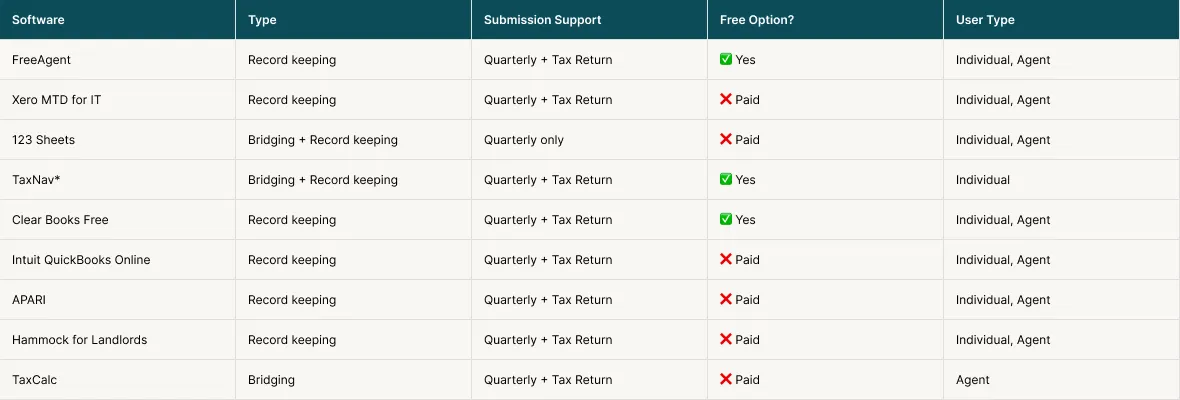
Consult Sterling Cooper Consultants for expert opinion
With the changing landscape of filing tax returns, you may find it hard to follow the process. We at Sterling Cooper Consultants are there to help you navigate the process. Our accountants and bookkeepers ensure that your records are in order. We also make sure that all your reports are ready on time for tax filing. Using our help, you can avoid penalties and get top tax-saving tips.To get help, contact us now.
Simplify taxes with expert planning, self-assessment,
VAT returns & corporation tax services in the UK. Ensure maximize savings today.
FAQs
Yes. HMRC is asking volunteers to take part in the MTD for Income Tax testing phase before the 2025/26 tax year. This will enable you to become familiar with the system at an early stage and also contribute towards its evolution. You should pass the eligibility and have compatible software.
When you attempt to sign up, your circumstances will be automatically compared with the HMRC eligibility rules.
An Accountex survey conducted recently shows that MTD is seen by 81.7% of accountants as their greatest challenge in 2025. It is demanding significant reforms, involving digital record-keeping, quarterly reporting, and the use of software. There are still a lot of unprepared firms, as 34% of them report not being ready by the 2026 rollout.
79.08% of accountants view MTD as a great opportunity. It allows for interaction with clients more often, has better insights on the business performance, and paves the way to upselling, advisory services, and closer relations with clients.
It entails moving from paper-based or spreadsheet accounting to an electronic system. It also removes the time-consuming job of manually entering data onto the HMRC website.
Recent Posts