
Posted by:
Admin
Date:
June 24, 2026
Category:
blogs
Xero vs QuickBooks: Which Is Better for UK Businesses?
Running a business in the UK means you will soon bump into the Xero vs QuickBooks debate. Both platforms rule the cloud accounting market for solid reasons. Loaded with features and working on any device, they make handling finances a breeze. Over 70% of UK SMEs now use cloud accounting. This shows how fast digital adoption has grown.
So you want to know what is best for your business in the Xero vs QuickBooks debate. The truth is that it depends on your business. This guide will help you decide which one is right for you. It will show you what you need to think about to make a choice, for your business.
Key Takeaways
- In the Xero vs QuickBooks comparison, both platforms offer strong cloud accounting features, but the best choice depends on your business size, industry and operational requirements
- When evaluating QuickBooks vs Xero, QuickBooks stands out for inventory management, CIS returns, and customer support, while Xero excels in usability, integrations and unlimited users
- The Xero accounting software vs QuickBooks decision should consider how closely you work with your accountant, as Xero remains the preferred platform among many UK accounting firms
- For businesses focused on UK compliance, Xero vs QuickBooks UK comparisons show that both platforms support Making Tax Digital (MTD) requirements and HMRC-approved reporting
- Understanding Xero vs QuickBooks cost is essential, as Xero’s higher pricing may offer better value for larger teams due to unlimited user access across all plans
- The cost of Xero vs QuickBooks should be assessed alongside the features you need, including payroll, multi-currency support, reporting and third-party integrations
- Before committing, take advantage of each provider’s free trial to test workflows, usability and automation features against your specific business needs
What Is the Background of Xero and QuickBooks?
Understanding the history behind each platform provides useful context for the QuickBooks vs Xero comparison.
Xero was started in New Zealand by Rod Drury and Hamish Edwards in 2006. They made Xero from scratch as a cloud based solution. This was a great deal because most accounting software was still on desktops at that time. Xero was different because it was built specifically for the cloud. That heritage matters which means Xero was designed for the internet era from day one, not retrofitted into it. Today, it has over 4.6 million people who subscribe to it from around the world. This also includes more than 300,000 businesses in the United Kingdom.
QuickBooks is a product of Intuit. Intuit is a company from America that was started in 1983 by Scott Cook and Tom Proulx. Intuit had a lot of success with a tool called Quicken that people used to manage their finances. Then they started making accounting tools for businesses.
Now QuickBooks is the popular accounting software in the United States with more than 5 million people using it all around the world. If you are in the United Kingdom there is something you should know about QuickBooks. The company stopped making the desktop version of QuickBooks for people in the UK in 2023.
Now the only version of QuickBooks that people in the UK can get is QuickBooks Online. When you compare Xero and QuickBooks you see they have both improved a lot.
What Do Xero and QuickBooks Both Offer?
Before we get into the differences in this quickbooks vs Xero comparison, understanding the shared features is an important first step in any Xero vs QuickBooks comparison, including:
- Cloud based access from any device
- Income and expense tracking
- Custom quotes and invoices
- Bank reconciliation
- Advanced financial reporting
- Mobile apps
- Help in Making Tax Digital (MTD) for VAT and Income Tax (ITSA)
- Bookkeeping tools that uses AI
On the AI front, Xero has launched JAX (Just Ask Xero) for automated transaction categorisation and cashflow forecasting. QuickBooks has its Intuit Intelligence feature doing similar work, with a more powerful Finance Agent available on the top tier Advanced plan.
Both of these are approved by HMRC for MTD compliance. This is something that businesses will have to do from April 2026 if they earn more than £50,000. The MTD compliance is going to be mandatory for these businesses.
Interesting Fact:
Both Xero and QuickBooks offer mobile apps, allowing business owners to send invoices, capture receipts and monitor cash flow on the go.
Xero vs QuickBooks Pricing: What Will You Actually Pay?
Pricing is one of the biggest differences in the Xero vs QuickBooks debate. Here is how they currently compare for UK users.
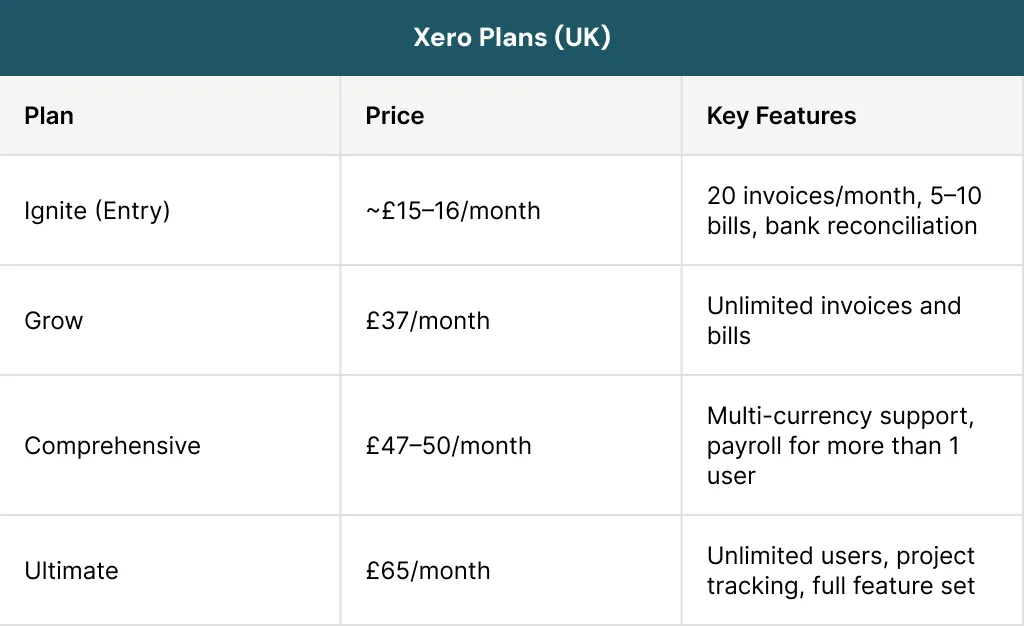
Xero increased its prices noticeably in 2024-25.Their Grow plan went from £26 to £37 a month. Previously, their Standard plan was at £15 per month which is now replaced by the Ignite plan. They hiked the prices again in October 2025.
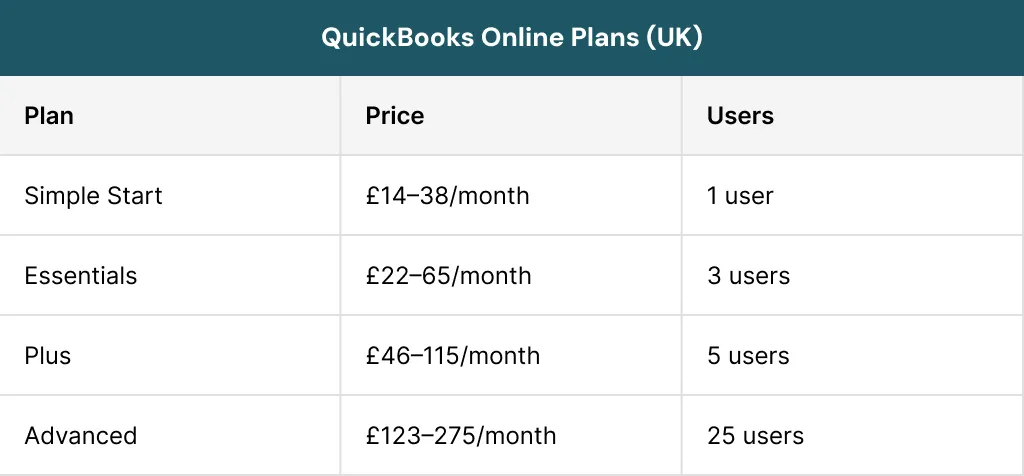
QuickBooks has a Sole Trader plan which costs about £10 per month. This makes QuickBooks the cheapest way for people who are self-employed in the United Kingdom to do their accounts.
The cost of using QuickBooks is going up. The price of the Plus plan went up by more than 64% between the year 2020 and 2025. The reason for the price increase is because of features that use artificial intelligence as defined by QuickBooks. These new features are part of the QuickBooks Plus plan.
The key pricing difference is that Xero allows unlimited users on all plans. QuickBooks restricts users per tier. If you have a team of more than five or six people, then Xero will probably be the cheaper option overall.
What are the Key Features of Xero and QuickBooks?
Now look at why the Xero vs QuickBooks comparison is really useful. First of all, we should go through some important features one by one.
1. Invoicing
When it comes to the process of invoicing, there is no doubt that both Xero and QuickBooks are great tools for professional billing and faster payments.
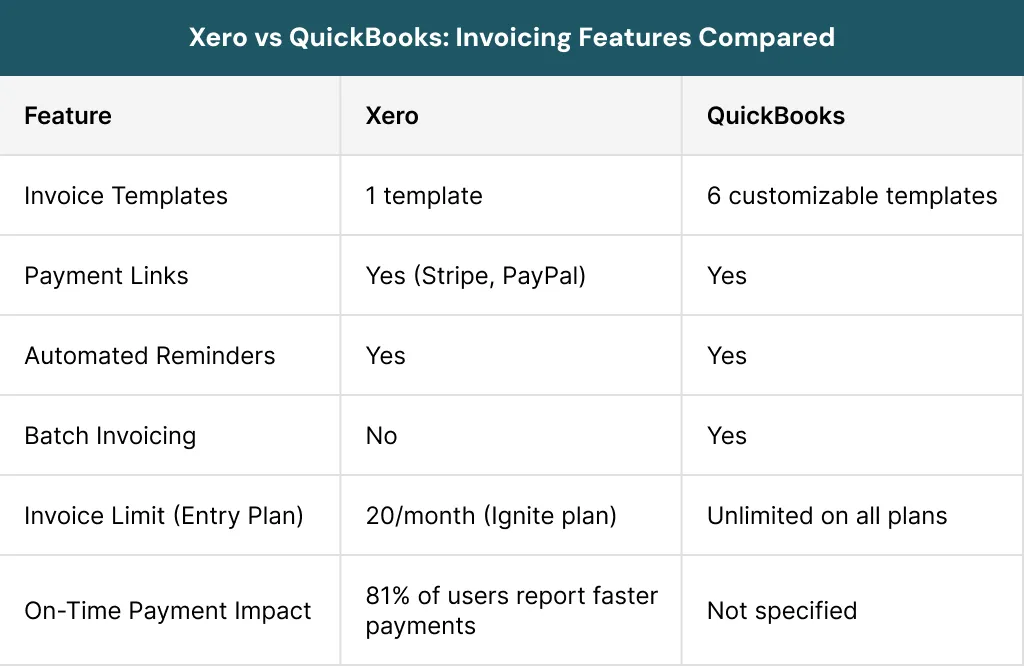
QuickBooks leads if you need lots of design flexibility and high invoice volumes. But Xero wins if you want fast payments with less follow up needed.
2. Bank Reconciliation
Bank reconciliation is one of those tasks that can eat up hours of your week if you are doing it manually. Thankfully, both Xero and QuickBooks take most of that work off your plate by connecting directly to your bank and pulling in transactions automatically. Both platforms use smart automation to keep your books accurate and up to date. Automation makes them strong contenders when comparing Xero accounting software vs QuickBooks in this area.
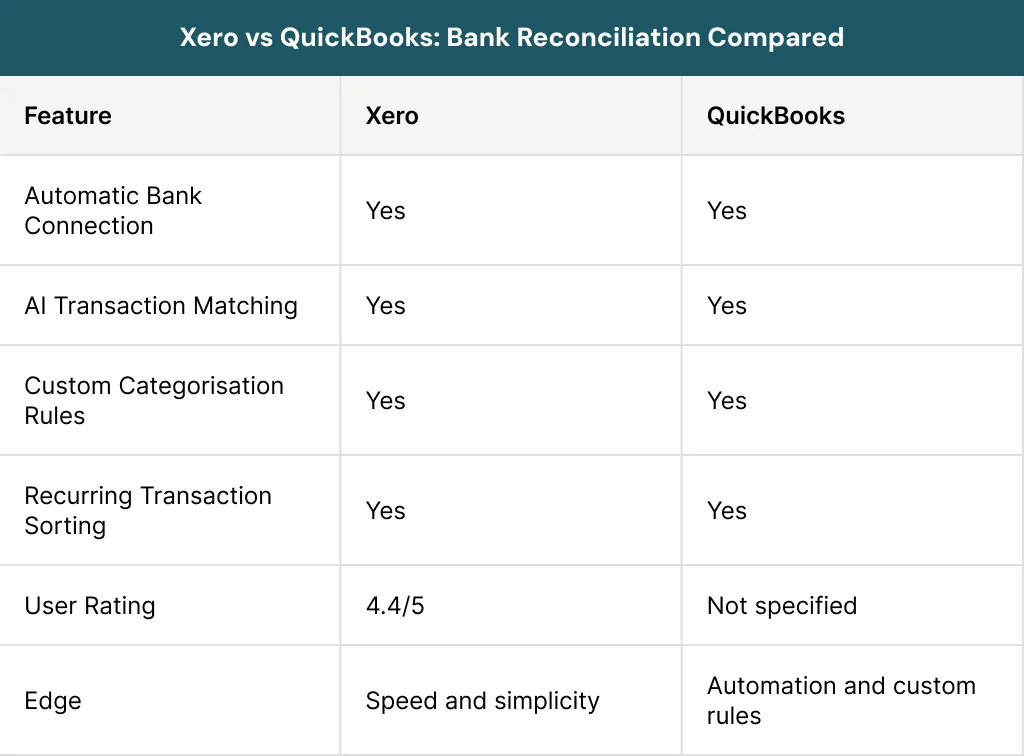
Both platforms handle bank reconciliation very well, but Xero gets a slight edge for speed and ease of use in day to day reconciliation.
3. Reporting
Good reporting gives you a clear picture of how your business is performing. Xero and QuickBooks both offer great reporting tools, but in different styles. Xero is all about flexibility; you can create reports tailored to your needs. QuickBooks, on the other hand, goes for preset templates, making it super easy to start right away.
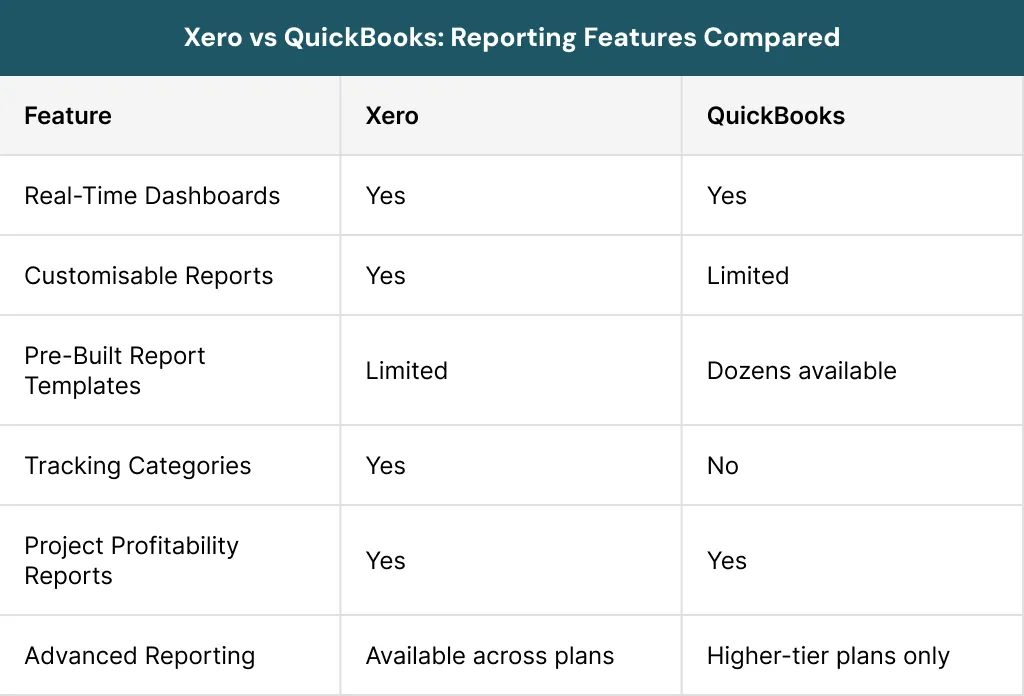
Xero is great if you want something flexible and customizable. QuickBooks works best for people who prefer ready to use templates without the need to customise.
4. Multi Currency Support: Xero vs QuickBooks
If your business trades internationally, having reliable multi currency support is not a nice to have but it is essential. Xero and QuickBooks both have this feature, but their plans unlock it at different price points. It depends on your team size and budget, so one might end up being way cheaper than the other.
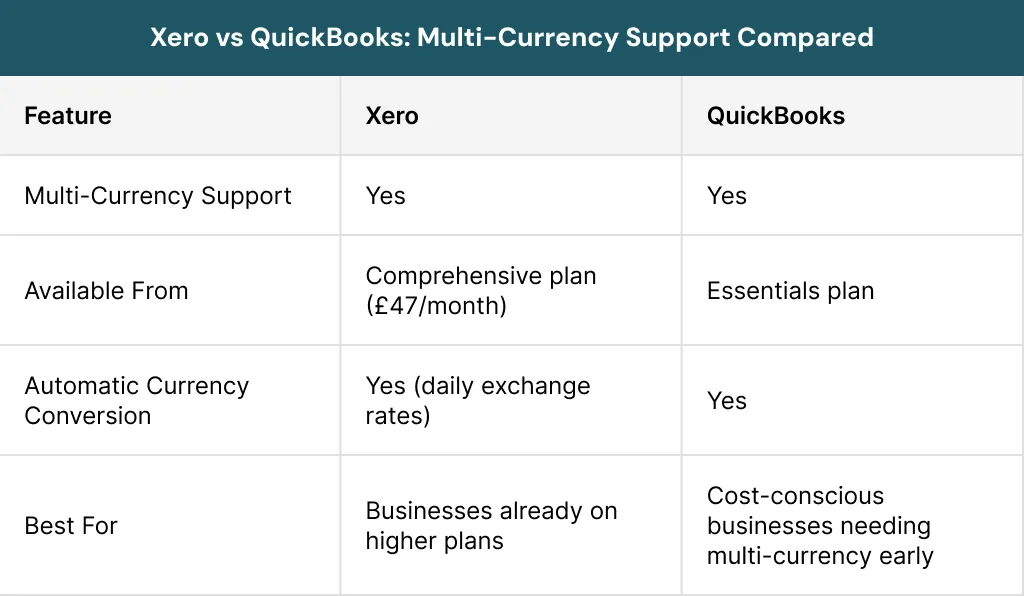
QuickBooks makes multi currency more accessible at a lower price point. Xero’s automatic daily exchange rate conversion is a handy feature, but you’ll need to be on a pricier plan to use it.
5. Inventory Management
For product-based businesses, inventory features often become a deciding factor in the QuickBooks vs Xero debate.Both platforms offer inventory tools, but the gap between them is quite noticeable. If inventory management is a core part of your operations, this section could be the deciding factor in your Xero vs QuickBooks decision.
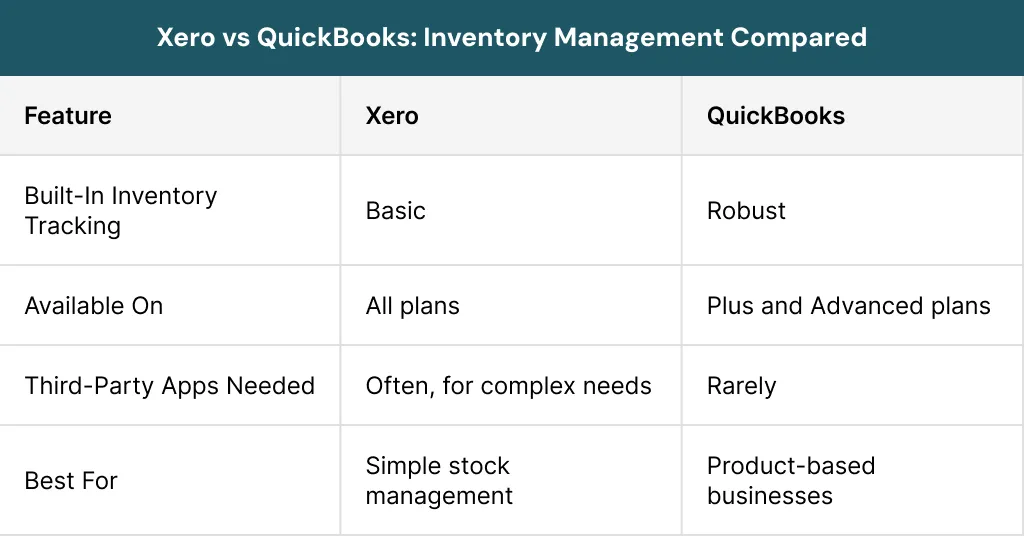
QuickBooks is the clear winner for inventory management. Xero can handle the basics, but growing product based businesses will likely need to integrate a third party app.
6. CIS Returns
For construction businesses, Construction Industry Scheme (CIS) compliance is a non-negotiable part of running the books. This is one area where the two platforms take very different approaches and it could have a real impact on your monthly costs.
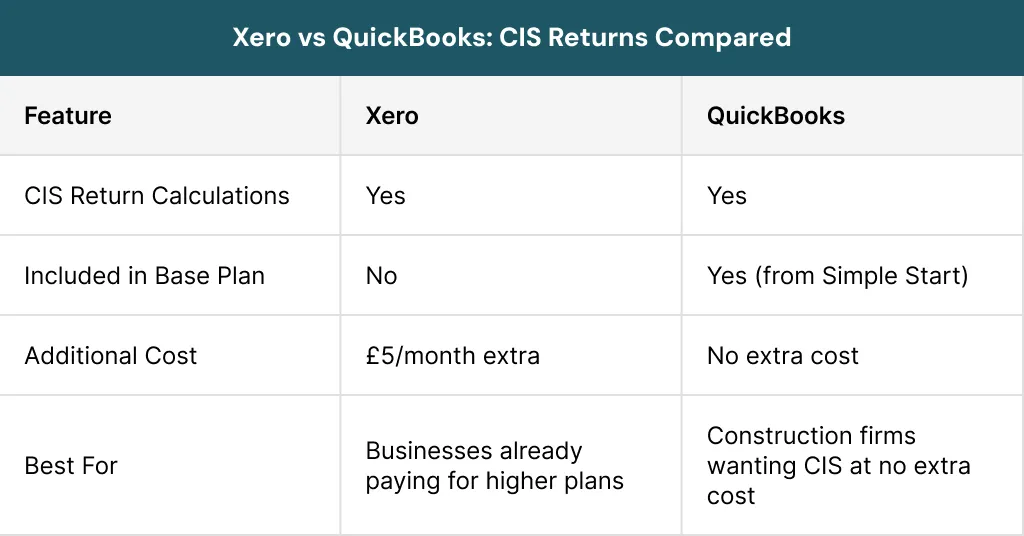
If you are in the construction industry, QuickBooks gives you CIS returns from its most basic plan at no extra charge. With Xero, you will pay an additional £5 per month regardless of which plan you are on.
7. Payroll
Payroll is something every business with employees needs to get right. Neither platform makes it free for UK users, but they do handle it differently and knowing this upfront helps you budget accurately.
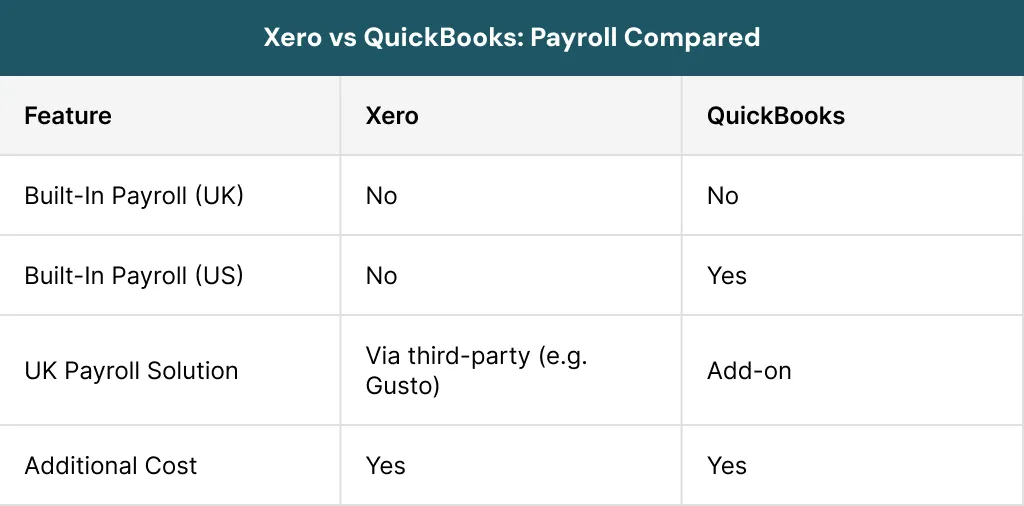
Neither platform includes free payroll for UK businesses, so factor in the added cost whichever way you go. QuickBooks has a built in solution for US users, while Xero relies on third party integrations like Gusto for payroll functionality.
How Easy Is It to Use Xero and QuickBooks?
Usability is another key factor when comparing Xero vs QuickBooks. Ease of use can make or break your experience with accounting software, especially if you are not a numbers person. When comparing Xero accounting software vs QuickBooks from a usability point of view, both platforms have their strengths. It really comes down to what kind of experience you prefer. Xero favours a clean and minimal design while QuickBooks puts everything front and centre on the dashboard.
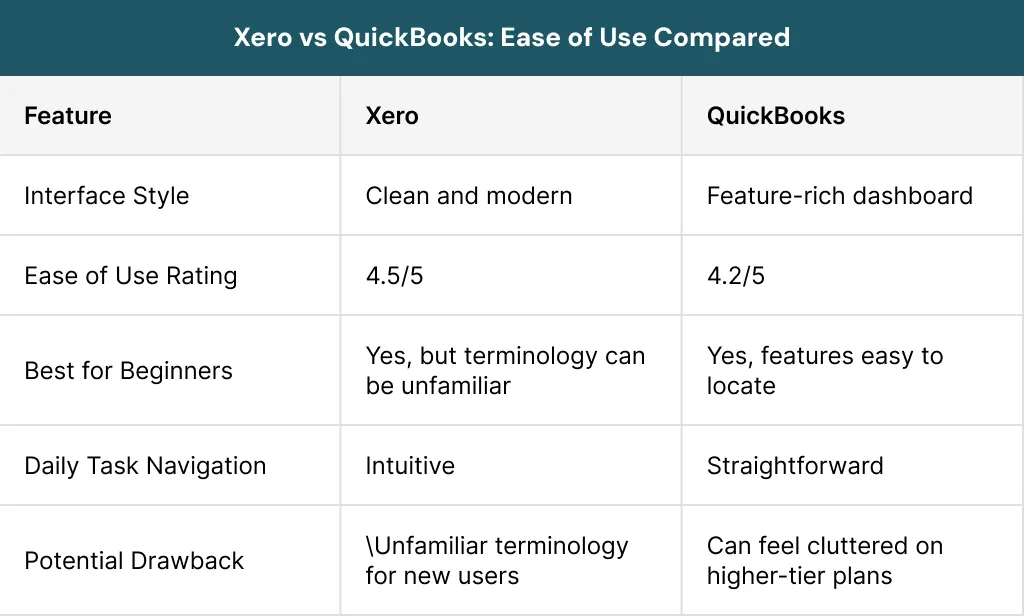
Xero edges ahead on overall ease of use but QuickBooks makes it easier to find features quickly. If you are brand new to accounting software, either will work but just expect a small learning curve with both.
Xero vs QuickBooks: Which Has Better Integrations and Apps?
The ability to connect your accounting software with the other tools you use daily can save you a huge amount of time. In the Xero vs QuickBooks integration race, both platforms offer a wide range of third party connections. There is still a clear gap in terms of volume and openness. The right integration ecosystem is really important, for your e-commerce connection, your payroll tool and your Customer Relationship Management system.
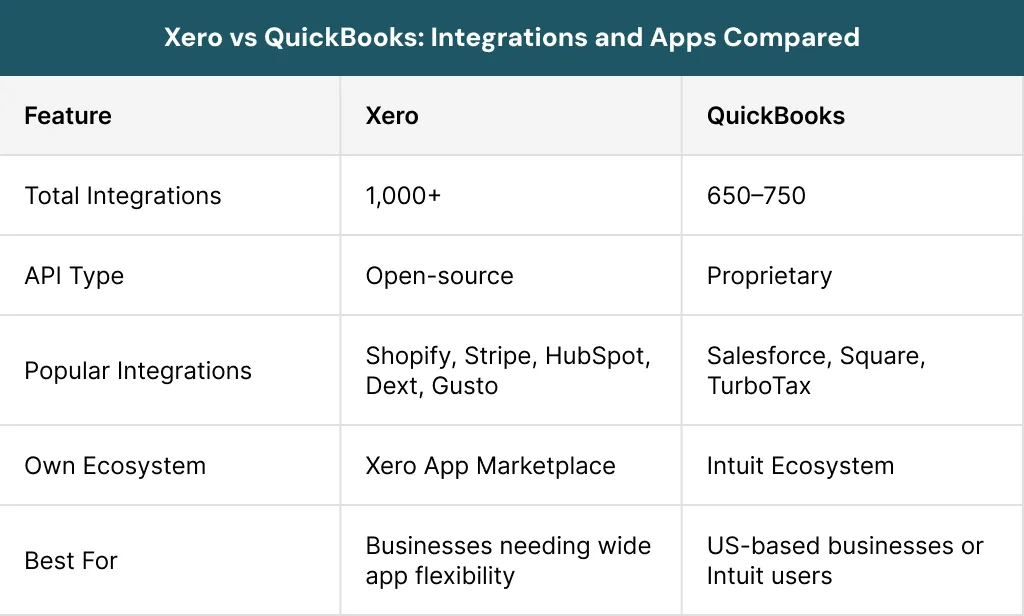
While evaluating Xero accounting software vs QuickBooks, Xero is ahead when it comes to integrations. Its open API also makes it more flexible. This is really helpful for businesses that have specific needs. They can easily connect Xero to tools. QuickBooks delivers solid functionality, but its ecosystem truly excels for businesses using Intuit products or based in the US.
Which Platform Offers Better Customer Support?
Support quality can significantly influence your Xero vs QuickBooks decision. You want to know that you can get help when you need it. If something goes wrong with your accounts, you do not want to be waiting for an email reply. The way they handle customer support is very different. How quickly you can get help with QuickBooks or Xero can really affect how well your business runs every day.
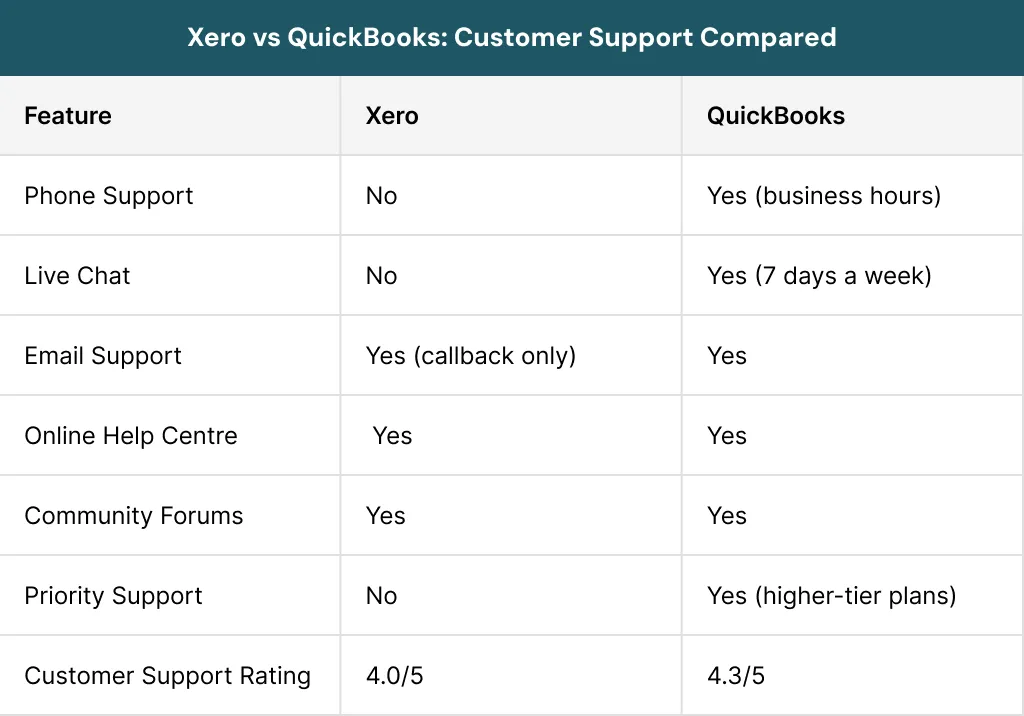
QuickBooks wins when it comes to customer support. If you want to talk to a person right away, QuickBooks is a better option. Xero has some self service resources, but many users get frustrated because they cannot call or chat with someone live. QuickBooks is more reliable, in this case.
Xero vs QuickBooks: Which Platform Is More Secure?
When it comes to your financial data, you really need to think about security. It is not something you can ignore. The good news is that Xero and QuickBooks take security seriously. They both have protections in place. Xero uses one approach and QuickBooks uses another. You can be confident that your data is safe, with either one.
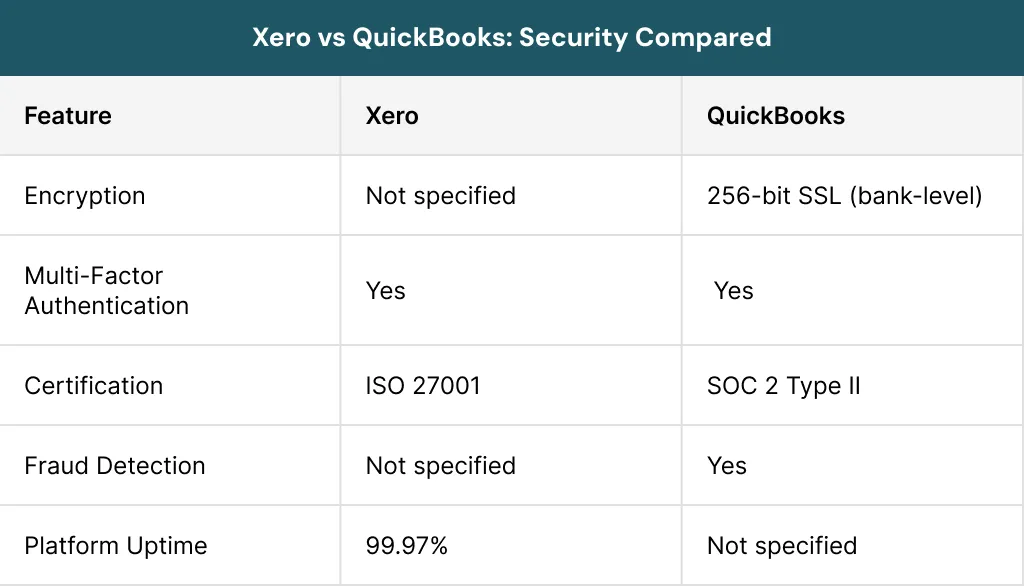
Xero and QuickBooks are both very secure. They get certified in different ways. Xero has something called ISO 27001 certification. It is running almost all the time with 99.97% uptime, which is really good. On the other hand, QuickBooks has very strong bank level encryption and it can detect fraud, which makes it a great choice for businesses that need to be very secure.
Did You Know?
Most data breaches happen because of weak passwords, which is why enabling two-factor authentication is essential regardless of which platform you choose.
Which Accounting Software Do UK Accountants Prefer?
This is an important factor when deciding Xero vs QuickBooks for your business. The majority of UK accounting practices are Xero certified, making Xero the dominant choice in UK professional workflows. If your accountant already uses Xero, collaboration will be smoother.
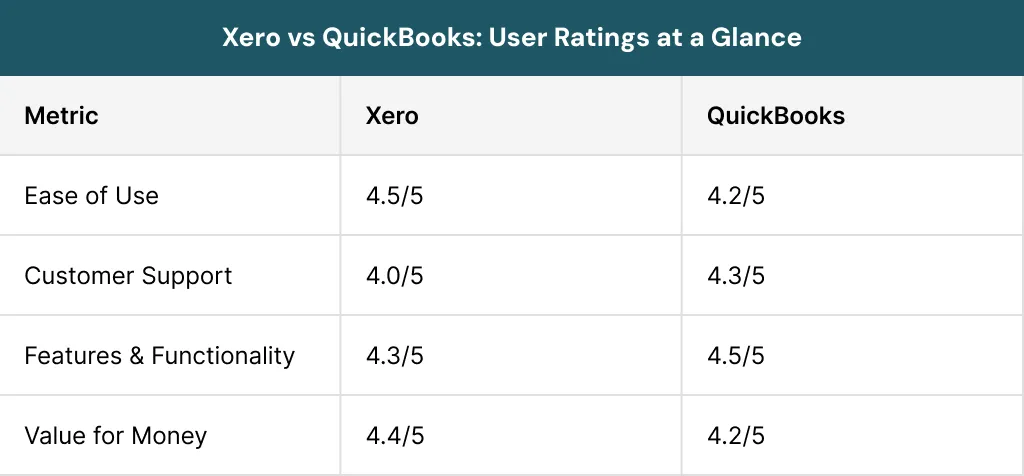
QuickBooks is popular and holds a strong second position in the UK. It is the clear leader in the US market and rules the US rather than the UK.
Quick Tip
Always check which accounting software your accountant prefers before choosing a platform – it can save time and reduce year-end headaches.
What Is Sage and FreeAgent: How Do They Compare?
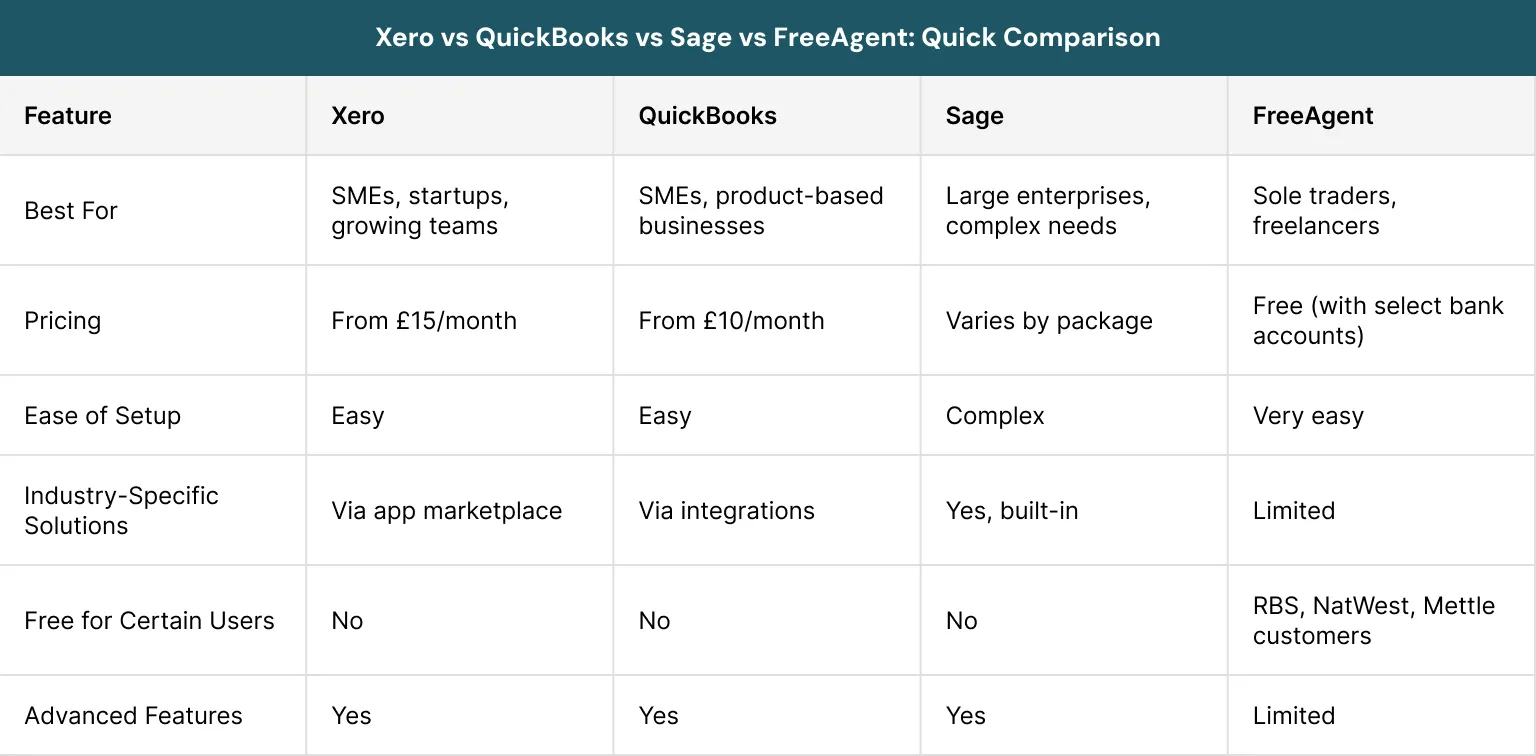
While the Xero vs Quickbooks debate covers most UK small businesses, it is worth knowing that other options exist. Sage and FreeAgent both have their place in the market and depending on your situation, one of them might actually be worth a look alongside the big two.
For most small to medium sized UK businesses, the Xero vs QuickBooks decision is the right place to focus. Sage suits larger enterprises with complex requirements, while FreeAgent is a great no cost starting point for sole traders and freelancers banking with RBS, NatWest or Mettle.
In the United Kingdom, people who do payroll and accounting will be using products in February 2026. Xero is the one that most people use, with 45.11% of the money being spent on Xero. This is more than QuickBooks, which has 17.78% and Sage, which has 13.19%. This shows that Xero is the choice for payroll and accounting in the UK and lots of people use it.
In the UK payroll and accounting market in February 2026, Xero was leading with 45.11% spend share. Xero was ahead of QuickBooks which had 17.78% share and Sage which had 13.19%. This confirms that Xero is really dominant in the UK.
Accounting is the language of business.
– Warren Buffett, Chairman and CEO of Berkshire Hathaway.
Xero vs QuickBooks: Which Should You Choose?
If you have been trying to decide between QuickBooks and Xero, the below points should help you make a decision that is right for you.
Choose Xero if:
- You have a growing team and need multiple users without paying extra
- You work closely with a UK accountant (most prefer Xero)
- You want a clean, modern interface and strong customisable reporting
- Your business operates internationally and needs multi currency support
- You want the largest app marketplace for third party integrations
- You are a sole trader or small business looking for an intuitive platform
Choose QuickBooks if:
- You need phone and live chat support and don’t want to rely on email
- You run a product based business needing advanced inventory management
- You are in construction and need CIS returns without paying extra
- You are self employed and want the most affordable compliant option (Sole Trader plan)
- You need advanced reporting and automation out of the box
- You manage a large volume of transactions or complex projects
Real Life Example
King of Shaves, a brand that makes shaving and skincare products, asked BookCheck to help them simplify their accounting system. They wanted to save a lot of money. Their old accounting and stock management software was too complicated and costly. So they decided to switch to a cloud based solution. They chose Xero as their accounting platform.
One of their headaches was sorting out Amazon payments and sales. This was really hard to do with their system. When they connected Xero to the A2X app, the problem went away. The sales data got put together automatically and matched to their bank transactions. This saved them six hours every month of reconciliation work. King of Shaves was happy with the change to Xero and A2X. They were able to focus on their business.
Conclusion
In the Xero vs QuickBooks comparison, we have found out that both are excellent platforms. Xero and Quickbooks are not better than each other in every way. They are just good for different types of businesses. When you are trying to decide between Xero and Quickbooks, you have to think about:
- How many people are on your team?
- What features do you really need?
- How much support do you want?
Xero is really good in user experience, integrations with other programmes, unlimited users and UK accountant preference. QuickBooks wins on customer support, inventory tools, CIS inclusion and value for sole traders. Ultimately, the right QuickBooks vs Xero choice depends on your business goals and workflows.
The good news is that both offer a 30-day free trial. The best thing you can do is try the one that sounds most like a match for your needs and see how it turns out in practice. Your business finances are too important to pick software blindly but with everything covered above, you are in a much better position to make the right call.
Sterling Cooper understands that picking the right accounting software can feel overwhelming, especially when both platforms have so much to offer. Our team can assess your business needs and recommend the best fit whether that is Xero, QuickBooks or something else entirely. Contact us today and let us make the decision simple for you.
Struggling with unclear financial data each month?
Many UK SMEs face the same challenge. Strong management reporting improves financial visibility, supports better decisions, and helps businesses stay in control of their finances. If you are facing these issues, get in touch today to see how the monthly management reporting can help grow your business.
FAQs
Monthly management reports are structured documents that summarize a company’s financial and operational performance over a specific 30-day period. They provide decision-makers with a consistent, timely overview of business health, allowing them to track Key Performance Indicators (KPIs), assess budget adherence, and make informed strategic adjustments.
Monthly management reports are vital for growing businesses because they provide a timely, data-driven snapshot of financial health. Rather than waiting for annual tax returns, these regular updates help owners monitor cash flow, track key performance indicators (KPIs), and adjust strategies before minor issues escalate.
A monthly management report is an internal tool that summarizes a company's financial and operational performance over the past 30 days. It typically includes an executive summary, core financial statements (P&L, cash flow, balance sheet), key performance indicators (KPIs), budget tracking, and actionable recommendations for the upcoming month.
Management reports should be reviewed on a tiered schedule depending on the data type: daily/weekly for operational metrics (like sales or cash flow), monthly for comprehensive financial and strategic reviews, and annually for high-level governance. This cadence ensures timely course corrections without overwhelming leadership.
Monthly management reports are generally better for day-to-day business operations and proactive decision-making than annual accounts. While annual accounts are essential for tax compliance and legal filings, they arrive too late to guide business strategy. Monthly reports provide timely financial visibility and control.
Recent Posts

How to Build a Cash Reserve for Business Stability
August 11, 2026

How to Forecast Cash Flow During Economic Uncertainty
August 6, 2026