

Posted by:
Admin
Date:
February 16, 2026
Category:
blogs
What Are the Benefits of Automated Payroll Processing?
In the modern dynamic world, payroll by hand is risky and painfully slow. Outdated payroll systems have been recorded to be the cause of 20% error in payroll runs. Fixing just one of these mistakes can cost as much as $291. HR teams have to spend up to 29 workweeks per year to clean up these mistakes. Automatic payroll can save you from this situation. Statistically, errors in automatic payroll systems have been reported to be less than 1%. This is a significant decrease from outdated systems. This blog covers everything you need to know about payroll automation.
What is Payroll Automation?
Payroll automation is the process when you use software to handle the process of paying your employees. You don’t have to do every step manually. Rather than spending hours on spreadsheets or double-checking tax calculations, the software system does the work for you. This payroll process automation helps your business run payroll faster and more accurately. You make significantly fewer mistakes when you use this automatic payroll.
What Tasks Are Involved If You Automate Payroll Process?
Payroll automation can be really beneficial. If you automate payroll process it can handle all of the major steps required in payroll processing:
Wage and salary calculations
It automatically calculates how much each employee should be paid. Whether they are paid an hourly pay, a fixed income, or get incentives or commissions, the system handles all of the maths.
Tax deductions and contributions
The software is aware of how much should be subtracted for pensions, national insurance, income tax, and other required contributions. To comply with the most recent tax regulations, it automatically updates.
Payslip creation
The system creates digital pay slips for every employee after its calculations are complete. These can be accessed via an online portal or sent via email.
Direct deposits to employee accounts
The system creates digital pay slips for every employee after its calculations are complete. These can be accessed via an online portal or sent via email.
Report filing and staying compliant
By creating and submitting the necessary reports to HMRC and maintaining accurate payroll records, the system assists you in remaining in compliance with the law.
Fully Automated vs Semi-Automated Payroll Systems
There are two main types of automated payroll systems. It is important to know the distinction between the two.
1. Fully automated payroll systems
Once they are established, these systems operate payroll mostly independently. Without your assistance, they compute pay, deduct taxes, create pay slips, process payments, and pull data from time-tracking or HR systems. They work well for companies looking for a dependable, hands-off payroll approach.
2. Semi-automated payroll workflows
These systems may require some manual input, but they still save time. Here, manual input refers to handling one-time bonuses, updating salary adjustments, and approving hours worked. They handle the majority of the work for you, but if you want more control, they can give it to you.
Who Should Use Payroll Automation?
If you automate payroll process, it is especially beneficial to those that are growing or have complex requirements. Small businesses can take advantage of it to avoid errors. Even though their team is small. An automated payroll process can still help them avoid hefty penalties. Startups that are growing quickly and hiring rapidly can also use it. If their employees are being hired at different locations, then it is even better that they choose an automated system. Global companies can use it to pay people in different locations. It helps them follow local laws while making payments. Hybrid and remote teams can also greatly benefit from it. They can pay freelancers or part-time workers working flexible schedules with ease.
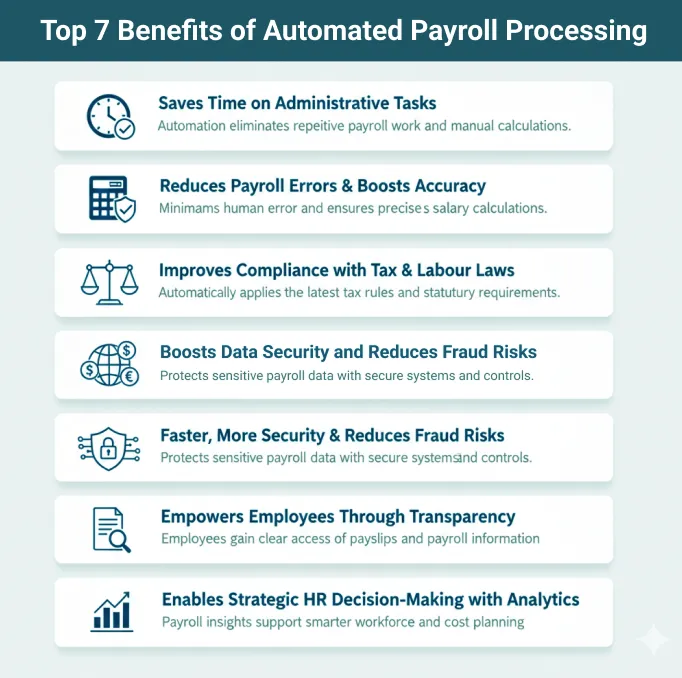
Top 7 Benefits of Automated Payroll Processing
The benefits of payroll automation extend far beyond saving time. It improves accuracy and reduces risk. You can scale your business more effectively. Here are some key benefits of automated payroll systems:
1. Saves Time on Administrative Tasks
Despite all the other benefits, saving time is still the biggest reason why many businesses use payroll automation. Doing payroll manually means a lot of repeated tasks. You have to enter data, check spreadsheets, do hourly calculations, and then get approvals. It often needs several departments to work together. When you automate payroll process, most of these steps happen on their own. The system collects employee hours from time tracking software, does the maths, and creates payslips automatically. It can also run automatic payroll on set schedules, weekly, bi-weekly, or monthly. This can be done without needing constant input. You don’t have to waste hours doing manual checks anymore.
2. Reduces Payroll Errors and Boosts Accuracy
A common issue with manual payroll is human error. Employees can get paid the wrong amount because of typing mistakes, forgotten deductions, or using the wrong tax rates. With payroll automation, these problems are much less likely. The system uses smart rules to make sure everything is accurate. Automated payroll processing takes care of key tasks like:
- Tax and National Insurance (NI) deductions
- Pension contributions
- Overtime, bonuses, and leave balances
- Benefits and statutory payments
Since there are fewer manual steps, there’s a much lower risk of mistakes. That means fewer salary disputes and more trust from your team.
3. Improves Compliance with Tax & Labour Laws
For growing businesses, staying on top of changing tax rules and labour laws can be very difficult. Your tax bracket may change, or you may have to register for VAT. With automated payroll processing, these updates are handled by the system itself. It automatically updates its calculations based on new laws. It also creates reports that meet government standards, like those required by HMRC. Some ways payroll process automation helps include:
- Calculating and deducting taxes correctly
- Filing tax reports on time (CIS, PAYE, RTI)
- Storing payroll records in line with GDPR and HMRC rules
- Reducing mistakes that can make you suspicious of audits
This gives business owners peace of mind. Thanks to automatic payroll, you can always stay compliant. You won’t have to worry about missing a change in the law.
4. Faster, More Reliable Global Payroll
Doing payroll manually becomes much harder when your business operates in more than one country. You have to manage different currencies, tax laws, and pay schedules. Each country also has its own labour laws, which you must follow. Payroll automation tools like Lano make this easier by handling these details for you. They support payroll process automation across multiple countries, take care of local tax rules, and manage payments in the right currencies. They also create pay slips and reports for each country. Whether you’re paying remote employees, freelancers, or whole teams in other parts of the world, automated payroll processing helps make sure everyone is paid correctly and on time.
5. Boosts Data Security and Reduces Fraud Risks
Payroll data includes very private details like bank account numbers, salary amounts, tax IDs, and national insurance info. If this data is handled the wrong way or seen by the wrong person, it can cause serious problems. With payroll automation, your data is better protected. These tools use strong safety features to keep your information safe. For example:
- Only approved people can see or change payroll files thanks to encrypted access.
- Any changes made in the system are tracked, so you always know who did what.
- Regular cloud backups make sure your data isn’t lost, even if there’s a crash or cyberattack.
This way, automated payroll processing doesn’t just stop outside threats. It also helps prevent internal fraud, because there’s less need for manual input or paper documents.
6. Empowers Employees Through Transparency
Automated payroll processing helps employees clearly understand their pay. They can easily see how much they are getting paid and what amounts are taken out for taxes or other reasons. There’s no more confusion about deductions or paid time off. Most payroll automation systems come with self-service portals. These let employees do things like:
- Download payslips and P60s
- See how much tax was taken and how much they earned so far
- Check how many holidays or leaves they have left
- Update their personal or bank information
This saves a lot of time for the HR team since they don’t have to answer the same payroll questions again and again. It also makes things more open for employees. For example, Paycom’s Beti software gives workers a look at their payslip before payday. They can check if everything is right and fix anything that’s wrong early. This helps avoid payment mistakes and keeps employees happier.
7. Enables Strategic HR Decision-Making with Analytics
Payroll process automation creates a lot of useful data. If this data is easy to access and understand, it can help businesses make smart decisions. Most tools have built-in dashboards that turn numbers into easy insights. These insights help HR and finance teams:
- Spot patterns like too much overtime or frequent delays
- Track salary spending by job, team, or location
- Plan ahead for hiring needs and payroll budgets
- Look at past trends to set better financial plans
This means payroll automation isn’t just about payments anymore. It also helps leaders plan smarter for the company’s future.
How to Automate Your Payroll Process
Payroll automation is about creating a quicker, more dependable system that saves time, lowers errors, and assures compliance. It’s not just about implementing new technology.
Here is a step-by-step guide if you want to transition to payroll automation:
Evaluate your current payroll system
The first step would be looking at your current payroll system. Do you have some basic software installed, or are spreadsheets still being used? Analyse your process as well. Is it fully manual, partially automated, or entirely outsourced? Additionally, find some frequent pain points that you encounter. These would be delays, calculation mistakes, or inaccurate payslips. This is crucial for you to figure out what exactly do you want to achieve from payroll automation.
Choose the right payroll software
The next step is to choose the appropriate software after you have identified the weaknesses in your current setup. While choosing the software for your business, you have to consider your business’s size, structure and future goals. You should choose a platform that facilitates worldwide payroll, multi-currency payments, and local compliance if your business is expanding globally. Searching for software that works well with your current systems, such as accounting or HR platforms, is also beneficial. By selecting the appropriate tool, you may create a solid basis for dependable payroll automation.
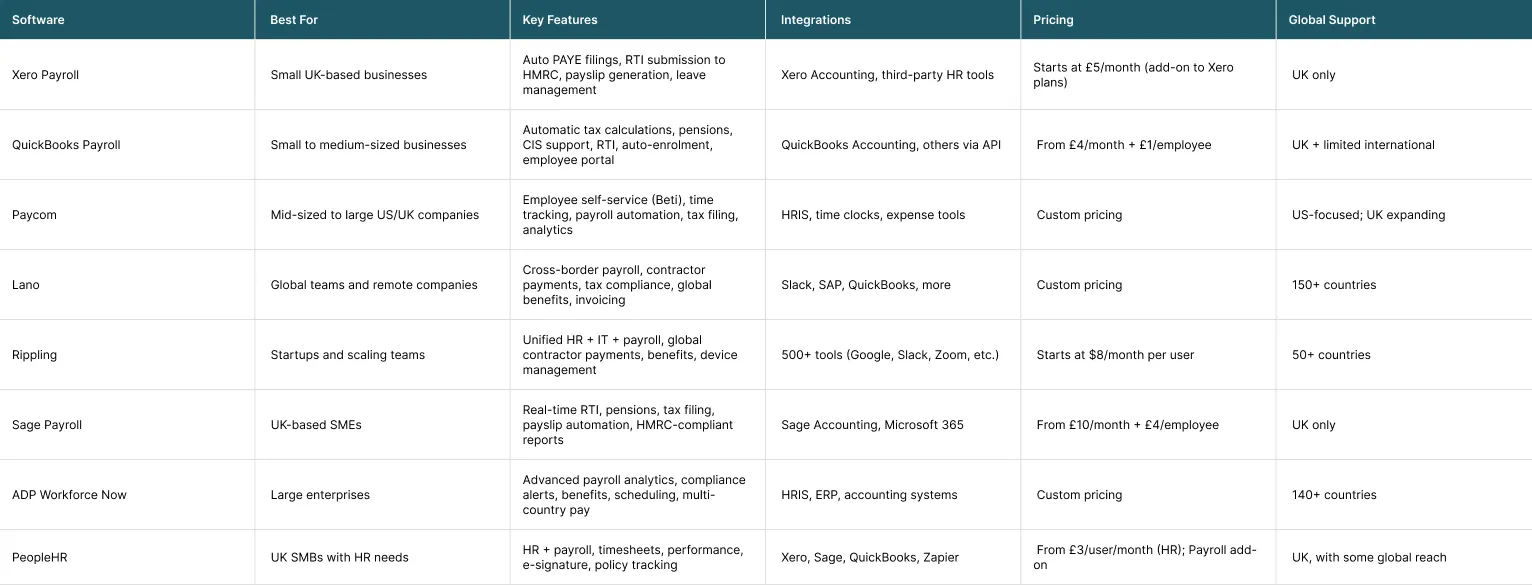
Top Payroll Automation Software and Tools
Here are some common tools and software that can be used for payroll automation:
Integrate with other systems
Your payroll software must interface with other important company systems in order to get the full benefits of payroll automation. This includes HRIS (Human Resource Information System). It can instantly retrieve employee data, accounting software to expedite expense reporting. It can also use attendance monitoring capabilities to document working hours. When these systems can convey information to each other, you don’t have to enter the same information multiple times. Thus, you reduce conflicts and outdated data.
Configure automation workflows
Once you have set your payroll software and connected other systems with it, you need to set it up. This step determines how your software will work. You can put in your own rules in most payroll systems. You can tell it how to calculate taxes, handle bonuses, or approve overtime. You can also set up alerts to detect errors, such as missed hours or incorrect pay rates. These regulations ensure that your payroll matches your company’s policies and legal requirements. Once everything is set up, the system works by itself, reducing the risk of human error.
Test, review, and train staff
Before you begin fully utilising the new system, you must first test it. Run your payroll through both the new and old systems for at least one pay cycle. You can find out any errors before making your system official. This also gives you a chance to fix these errors once found. At the same time, teach your HR, financial, and admin staff how to operate the system correctly. You’ll also have to train your employees if your system has a self-service option. They will have to learn how to check their payslips, tax details, etc.. You will also have to teach them to update their information in the software. This will make your launch smooth.
Go live and monitor performance
After completing the training of staff and the trial run, it is time to switch to your new system. Constantly check how your system is performing. Also, set clear goals for your future. For instance, aim for fewer payroll errors and faster processing times. Keep an eye on these results so you can make small improvements over time. A well-monitored business helps your business stay organised. It also helps you follow laws as you expand further.
Common Concerns & Challenges of Payroll Automation
There are some common concerns that everyone faces when switching to payroll automation. They are more apparent at the start. Here are a few common ones:
Cost of payroll automation
One great concern is the time and cost for the setup. If your team is small, transferring the entire data might be an overwhelming task for them. In addition, they also have to install the software and attend training for using the system. This may seem costly at this point, but in the long run, you will save a lot more money than you were losing due to mistakes.
Resistance to change
Another major challenge is resistance to change. Most of your staff might already be used to older systems. They might hesitate in using the new setup. You can ease their transition by providing them with hands-on training. Explain to them how payroll automation will ease their lives. This will help you win their confidence for this transformation.
Technical issues
When you attach old tools or software to a new one, you may face some technical issues. Your outdated tools, also known as legacy systems, can slow down things or cause data mismatches. You can prevent this by choosing software that supports integration with older systems. Also, carry out migration in a step-by-step plan.
Conclusion: Why Payroll Automation is a Game Changer
Payroll automation smoothens your paying process in every way. It increases pay accuracy, follows the law, saves time, and allows employees to verify their pay clearly. Your team has less stress because of automatic payroll and your staff becomes happier. If your payroll is still done by hand or has frequent errors, it’s time to upgrade to a more efficient system. At Sterling Cooper Consultants, we can help you make this transition with ease. With our payroll services you can find simple payroll tools that save your time and solve your problems. We handle your payroll so that you can focus on growing your business.
Need help simplifying your payroll process?
Our specialists at Sterling Cooper Consultants offer fully automated payroll solutions designed to save you time, reduce errors, and keep your business compliant, no matter your team size. To get help, contact us now.
FAQs
It is the use of software to calculate pay, deduct taxes, provide pay stubs, and transfer salary without requiring manual input every cycle.
Choose a payroll tool, integrate it with your timesheets and accounting system, configure your pay rules, and test it before going live.
Yes, most systems use encryption, access limits, and audit trails to secure sensitive payroll data.
It can save HR teams hundreds of hours per year, up to 29 workweeks, especially by reducing errors and repetitive tasks.
Manual payroll raises the risk of errors, late payments, lost tax filings, and noncompliance penalties.
Recent Posts

What Is Workforce Analytics and Why Is It Essential for Modern HR?
February 11, 2026

How Capital Gains Tax Is Changing in April 2026?
February 10, 2026