Posted by:
Admin
Date:
March 9, 2026
Category:
blogs
5 Ways Cloud Accounting Can Save You Time and Money
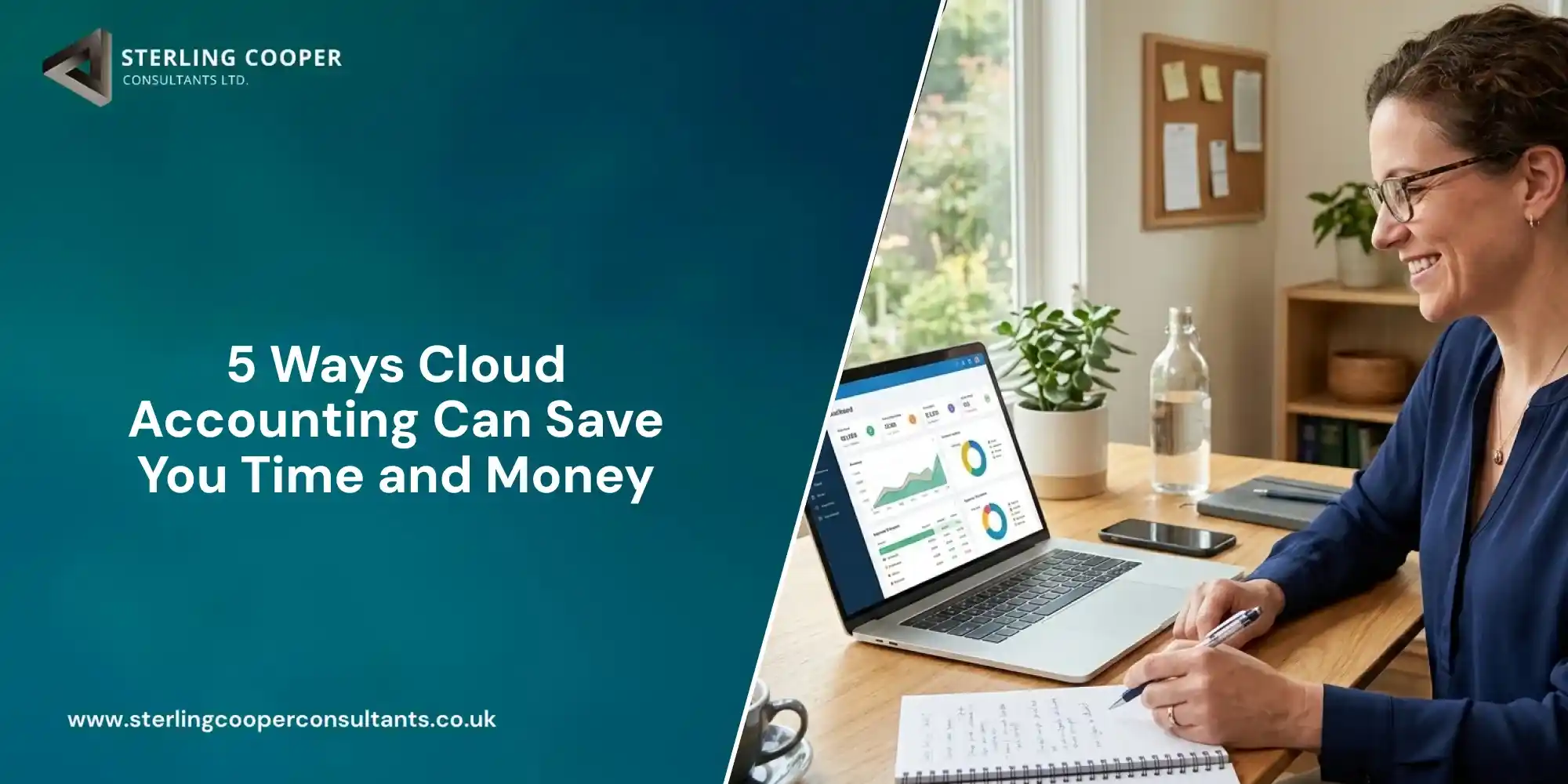
Do you feel stressed when thinking about numbers and accounts? Cloud accounting offers a simpler way to manage business finances. One of the benefits of cloud accounting is that it saves time and reduces cost. According to McKinsey, automation technologies can reduce time spent on routine administrative tasks by up to 60%.
Many businesses are shifting towards digital accounting to run their operations. It helps with data entries, reportings, cash flows and VAT submissions.
This digital accounting is becoming more important as UK tax rules obligate digital compliance. According to HMRC, all VAT registered UK businesses must now keep digital records. They tend to submit VAT returns using approved software under Making Tax Digital (MTD).
In this blog, you will learn:
- What is cloud accounting
- How does this work
- What are the benefits of cloud accounting
- How cloud-based accounting saves time and money
- Steps to switch from older accounting systems
- Limitations of cloud systems
- Who can benefit from cloud accounting
What Is Cloud Accounting?
Cloud accounting uses online software to record and manage finances. Your data is stored securely online. It is not saved on one device and you can access it from anywhere using the internet. Other people like accountants or bookkeepers can also access it with certain permissions. Everyone works from the same information.
Many UK businesses begin shifting to digital accounting softwares with expert advisers and this helps them to avoid mistakes during setup. This also helps them to transition to the new system with ease. Working with an experienced team ensures work efficiency as well.
How Does This Work?
This accounting system follows a clear process. Here is the step by step process:
- Connect your business bank account to the accounting setup
- Transactions appear automatically on the ledgers
- The accounting system records all income and expenses
- Accounting reports update in real time
You do not need to send files separately or wait for updates. Everything stays in check and works simultaneously in real time.
Digital tax administration will make it easier for businesses to get their tax right and keep on top of their affairs.
– Jim Harra, Chief Executive, HMRC
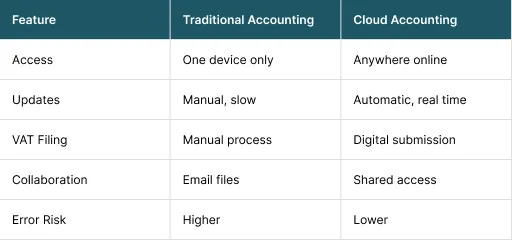
Cloud Accounting Versus Traditional Accounting
Cloud-based accounting is ideal for remote-friendly businesses needing real-time financial data. Traditional accounting is suitable for smaller and stable offline businesses.
Why Traditional Accounting Cause Problems for Many Businesses
Accounting should not feel stressful. Yet for many people, it does. The issue is often not the numbers but the system behind them. Many UK businesses still rely on:
- Spreadsheets
- Paper invoices
- Desktop software
- Manual data entry
These tools were useful in the past. Today, they cause problems. Businesses using traditional accounting methods normally face issues including:
- Data must be typed by hand
- Errors go unnoticed
- Files get lost
- Reports take time
- Single person can access records at one time
Each issue costs time and adds stress. Over time, these small problems grow into bigger ones. The cloud system removes many of these above mentioned issues.
Why Businesses Are Moving to Cloud Solutions
The benefits of cloud accounting are practical and attractive for businesses. This is not about technology only. It is about making work easier and efficient at the same time. Below are key benefits of why businesses are moving to digital accounting systems.
1. Less Manual Work
The most important advantage of this accounting method is that it reduces manual bookkeeping which takes a lot of time. Manual accounting causes mistakes. Typing numbers again and again increases risk of errors.
How Cloud Accounting Reduces Manual Work
Automation does most of the work. This removes daily admin tasks because:
- Bank feeds import transactions
- Rules sort expenses
- Invoices repeat automatically
- Totals calculate instantly
Why This Saves Money
Little savings can add up over months. Cloud-based accounting can save money in ways such as:
- Fewer errors
- Less fixing later
- Faster month-end work
2. Access Your Numbers at Any Time
Digital accounting gives instant access to financial data. You no longer wait for reports. With this system, you can do more in less time by accessing it from anywhere any time. You can:
- Check cash before spending
- Review invoices while travelling
- Share data with adviser
- Answer questions quickly
This way you can manage your business from anywhere in real time. Your accountant can rely on live data to give accurate advice.
3. Lower Accounting and Compliance Costs
Digital accounting reduces total accounting costs over time. This happens through efficiency which is a major financial benefit of it. Cloud accounting can reduce costs and increase efficiency in these areas:
- Less bookkeeping time
- Fewer errors to correct
- Faster year-end accounts
- Fewer urgent fixes
Clean data costs less to manage. HMRC explains that digital records help reduce errors and improve accuracy. Digital accounting complies with HMRC rules to make financial digital records.
This shift toward digital systems is one of the long-term benefits for UK businesses.
To learn more, check out our guide on making tax digital.
4. Better Control Over Cash Flow
Cloud accounting helps you see cash flow issues early. This is one of the strongest advantages of cloud-based accounting. In the manual accounting methods, cash flow problems appear suddenly because they grow slowly. Keeping an eye on your cash flow is easier with cloud software. You can have:
- Dashboards show income and costs
- Automatic reminders chase late invoices
- Spending trends become visible
- Forecasts show future gaps
5. Easier Work With Accountants and Teams
Cloud accounting improves communication. Older systems rely on emails and attachments causing confusion. Teamwork and collaboration improve because:
- Everyone sees the same data
- All updates appear instantly
- Fewer emails are needed
- No file version problems
This works well with payrolls as well. To learn more, check out our guide on payroll automation.
What Are Risks and Limits of Cloud Systems
Cloud accounting is very useful but at the same time it also has potential drawbacks. Few of the risks and limits include:
- Internet access is required
- Learning takes time
- Monthly fees apply
- Data security worries
How These Risks Are Managed
Most of these risks can be managed effectively through simple measures such as:
- A backup internet provider
- Simple training solves confusion
- Monthly fees recover by replacing different resources
- HMRC recognised systems meet UK security standards
Real Life Example: MMQ’s Move to Cloud Accounting
MMQ is a food distribution company with several branches across Iran. Each branch used the same accounting software, but the systems were not connected.
Reports were sent to the head office only at the end of each month, which delayed decisions. Main problems included:
- No integrated system between branches
- Delayed monthly reporting
- High IT travel and maintenance costs
- No centralised backup
After reviewing cost, security and IT capacity, MMQ chose a public cloud deployment setup.
After adopting cloud accounting, MMQ achieved the following benefits:
- Real-time financial access
- Integrated branch data
- Lower IT and infrastructure costs
- Faster and better decision-making
The shift to digital accounting helped the company save time, reduce costs and improve overall efficiency. This case study shows the real advantages of cloud accounting.
The longer you delay switching to cloud accounting, the more time and money you can lose.
How to Move to Cloud Accounting Step by Step
A clear plan helps to change the running system with ease. Here’s how to move to cloud software step by step.
Step 1: Review Your Current System
Start by understanding what is your current system and what causes stress. Your business may be using the following:
- Software
- Spreadsheets
- Paper files
Step 2: Select Suitable Software
Price of the cloud accounting software should not be the only deciding factor. When selecting cloud software, look for these important features:
- HMRC approval
- Bank connections
- Simple reports
- UK support
Step 3: Data Required for the Initial Setup
You must have all the important information for the setup before moving to the cloud including:
- Bank statements
- Supplier invoices
- Customer lists
- Opening balances
Step 4: Transfer And Check Records
Once your data is ready, transfer it carefully and check for errors. When you move data also check totals and VAT settings.
Step 5: Know The Basics of Accounting
Before shifting to cloud accounting, you must have the basic knowledge of accounting which includes:
- Invoices
- Expenses
- Reports
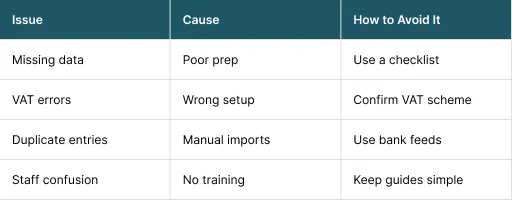
How to Avoid Normal Delays During Setup
Who Benefits Most From Cloud Accounting
Cloud accounting works well for small businesses, growing companies, VAT registered firms, businesses using advisers and owners wanting clarity.
Some businesses gain more from this accounting than others. It is about the needs of the business and not its size.
Conclusion
Cloud accounting is not just about keeping records online. It is also about managing the business in a smart way. It reduces manual tasks, avoids the risk of mistakes and gives you clear, real-time financial insight and overview. As a result, these long term benefits of cloud-based accounting help you save both time and money.
As UK tax rules continue to move toward digital systems, switching to cloud accounting is becoming essential. With Sterling Cooper Consultants, the shift can be smooth and highly beneficial for your business growth.
Get in touch today to simplify your business finances by having better control, strong cash flow and less stress.
Cloud accounting saves you time, reduces stress and cuts unnecessary costs. The sooner you switch, the sooner your business benefits.
Book an appointment to move to cloud accounting with expert guidance.
FAQs
Traditional accounting software is installed on one computer and can only be accessed there. Cloud accounting works online and stores your data securely on remote servers. You can log in from any device, with internet access. This makes it more flexible and easier to manage.
Yes, you need internet access to use cloud accounting in real time. It allows you to view, update and share financial data instantly. Most systems are secure and protect your data during short outages. Once the connection returns, everything remains updated.
No, cloud accounting is suitable for businesses of all sizes. Many small businesses and sole traders use it daily. It helps growing companies stay organised and compliant. The benefits apply whether your business is small or expanding.
Yes, most cloud accounting systems connect securely to your bank. Transactions are imported automatically into your records. This reduces manual data entry and errors. It also saves time on bookkeeping tasks.
Yes, cloud accounting keeps digital VAT records automatically. It supports Making Tax Digital requirements in the UK. This makes VAT submissions easier and more accurate. It also reduces the risk of mistakes.
Yes, you can give access to multiple users. Business owners, accountants and staff can log in at the same time. Everyone sees the same updated information. This improves teamwork and reduces confusion.
Recent Posts