Posted by:
Admin
Date:
August 28, 2026
Category:
HMRC Agent Services Account: The Complete Guide for Accountants
A failed HMRC login or a missing client authorisation can bring an accounting firm’s work to a sudden stop, especially when an important tax deadline is close. The problem is not always with the account itself. Access to HMRC services depends on several parts working together, including the HMRC Agent Services Account (ASA), Online Services for Agents (OSA), client authorisations, staff permissions and compatible Making Tax Digital (MTD) software.
Setting up an ASA is therefore only the beginning. A reliable HMRC setup requires a clear understanding of how these systems work together and how to manage them over time. This guide explains what the HMRC Agent Services Account is, who needs it, how it differs from OSA and what to check when access or client authorisation does not work as expected.
Key Takeaways
- ASA does not replace OSA. Many firms need both, depending on the services they use.
- A reliable HMRC setup also requires client authorisations, staff permissions and compatible software.
- MTD works best when accounts, authorisations and software are properly connected.
- Never share HMRC login details. Use the correct client authorisation process.
- Regularly review access, permissions, authorisations and software to prevent problems.
- When access fails, check the wider HMRC setup, not just the ASA.
What Is an HMRC Agent Services Account and Why Does It Matter?
An HMRC Agent Services Account (ASA) gives tax agents access to a range of HMRC digital services. It allows accountants to act on behalf of clients through supported online processes and is particularly important for firms working with digital tax services and client authorisations.
However, ASA does not replace every HMRC agent system.
Depending on the services a firm provides, accountants may still need to use Online Services for Agents (OSA). Client authorisations, staff permissions and compatible software can also be part of the wider setup.
This is important because creating an ASA does not automatically give a firm access to every HMRC service or every client. Before setting up or troubleshooting an account, it helps to understand what ASA does and where OSA is still needed.
ASA vs OSA: What Is the Difference?
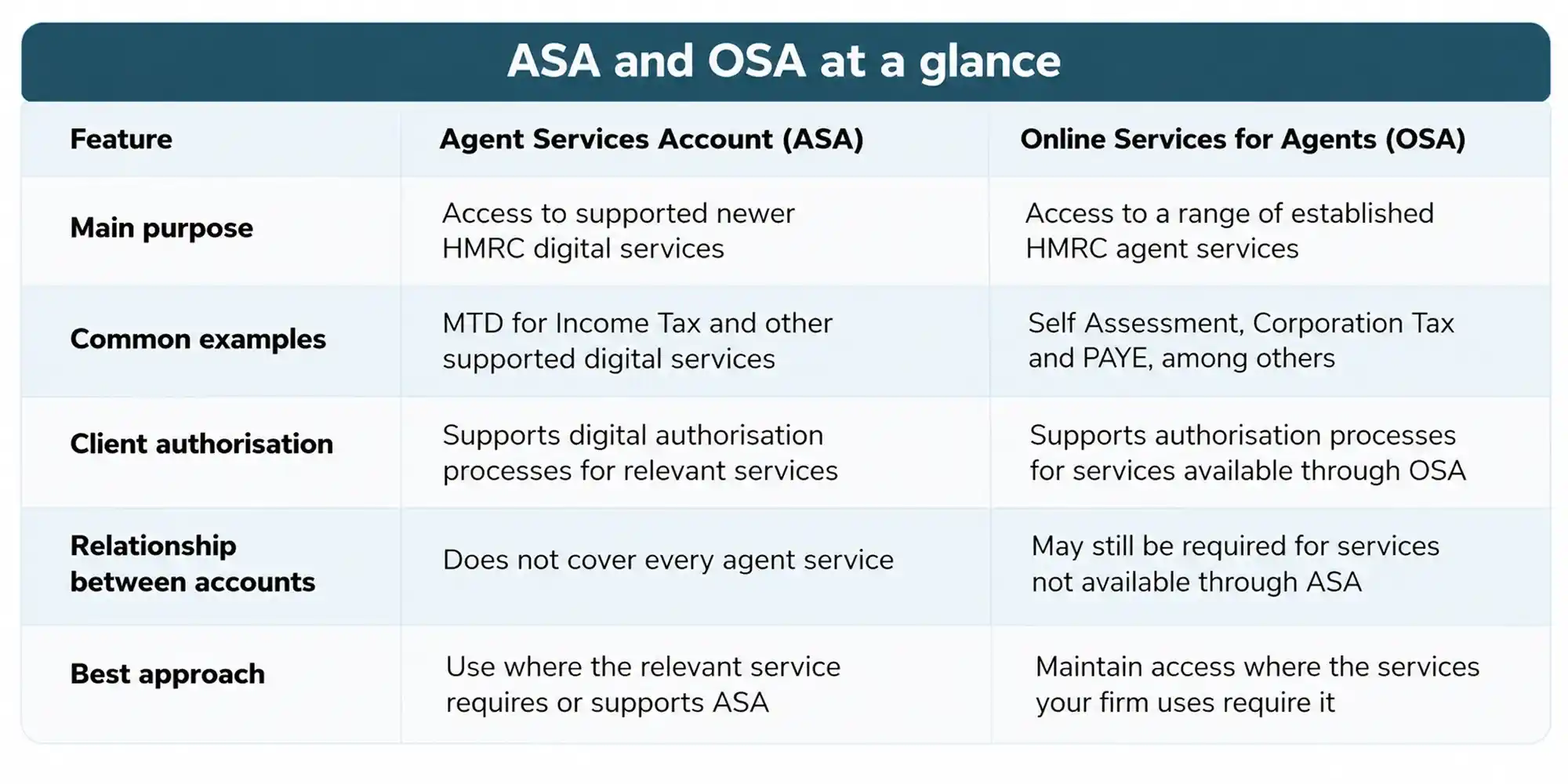
One of the most important things for an accounting firm to understand is that ASA and OSA have different purposes.
HMRC Agent Services Account (ASA)
The Agent Services Account provides access to newer HMRC digital services, including services connected with Making Tax Digital. Accountants can use ASA to request client authorisations and manage access to supported digital tax services.
HMRC Online Services for Agents (OSA)
Online Services for Agents provides access to a range of established HMRC services. Depending on what the agent is enrolled for, these can include Self Assessment, Corporation Tax and PAYE.
This means that setting up an ASA does not make OSA unnecessary. The account a firm needs depends on the specific HMRC service it is trying to use.
HMRC ASA vs OSA: Which Account Does Your Practice Need?
Knowing the difference between the two accounts is useful. But the more important question is which account your firm needs for each service.
There is no single HMRC agent account that covers everything.
HMRC research involving 873 agents shows why this distinction matters. Seventy-five per cent of agents said they used both ASA and Online Services for Agents. This shows that many firms need to work across both systems rather than relying on one account alone.
With this distinction clear, the next question is who actually needs an ASA.
Who Needs an HMRC Agent Services Account?
If you provide tax advice to clients and interact with HMRC on their behalf, you may be legally required to register with HMRC as a tax adviser and obtain an Agent Services Account. The exact requirements depend on your business and the services you provide.
For example, an ASA is required when acting as an agent for Making Tax Digital for Income Tax. HMRC also uses ASA for other supported digital services, so firms should always check the requirements for the specific services they provide. Depending on the services they provide, firms may also need to use OSA for services such as Corporation Tax.
But setting up the account is only one part of the process.
Once the account is active, your firm may also need to:
- Obtain the correct authorisation from each client.
- Add and manage client authorisations.
- Set up individual staff access.
- Give staff the right roles and permissions.
- Make sure the required software is compatible with the relevant HMRC service.
- Maintain access to OSA where certain services still require it.
These parts work together. An account can be correctly registered and still not give a firm everything it needs to manage client tax affairs effectively.
What Can Accountants Use an Agent Services Account For?
The value of an ASA depends on how well it works with the other parts of your firm’s HMRC setup, particularly client authorisations, staff access and other HMRC systems.
Managing Client Authorisations
Client authorisation is at the heart of acting for clients through HMRC’s online services.
Creating an ASA does not automatically give your firm permission to act for every client. For supported services, agents need to request authorisation through the relevant HMRC process.
The exact method can depend on the tax service. For example, the digital handshake allows an agent to send an authorisation request to a client, who can then approve it through the relevant HMRC service.
Keeping track of these authorisations matters. Your firm needs to know which clients have authorised you and which tax services those authorisations cover.
Supporting Making Tax Digital
Client authorisation is only one part of the digital tax process.
Making Tax Digital has made it even more important for firms to have the right account access, authorisations and software connections in place.
For Making Tax Digital for Income Tax, agents need an ASA and the appropriate client authorisation before signing clients up. Clients also need compatible software and must be correctly set up for the service.
This is why MTD preparation should not be treated as a software issue alone. The account, authorisation and software all need to work together.
How to Set Up an HMRC Agent Services Account Correctly
Once you know which services require an ASA, the next step is to set up the account and manage the access around it.
A reliable setup starts with accurate registration information and continues with proper client authorisations and controlled staff access.
1. Prepare Your Registration Details
Before applying, make sure the business and agent information provided to HMRC is accurate and up to date.
HMRC may ask for additional information or carry out checks during registration. Having accurate business and contact details can help reduce unnecessary delays.
Where relevant, firms should also make sure their anti-money laundering supervision information is correct and current.
2. Complete HMRC’s Verification Checks
HMRC may carry out checks before giving access to the account.
Responding promptly to requests and providing accurate information can help keep the process moving. Once the account is active, keep your firm’s registration and contact information up to date rather than waiting until an access problem appears.
3. Set Up Client Authorisations
After registering as a tax agent, you need authorisation from clients before you can deal with HMRC on their behalf.
The authorisation process depends on the tax service. Digital authorisation may be available for some services, while other services may use different routes.
One important rule should always be followed: do not ask clients to share their HMRC login details. Use the relevant HMRC authorisation process instead.
4. Manage Staff Access
An accounting firm’s ASA should not rely on shared login details.
HMRC allows administrators to create additional users and assign roles. When someone joins the firm, changes responsibilities or leaves, their access should be reviewed promptly.
This helps make sure current employees have the access they need while reducing the risk of former employees keeping access after they leave.
How to Maintain Your HMRC Agent Setup
Getting your accounts set up correctly is important. Keeping them up to date is what helps prevent many avoidable access problems.
A practical review should cover:
- ASA and OSA access
- Client authorisations
- Staff roles and permissions
- Agent registration and contact details
- Anti-money laundering supervision details where applicable
- MTD client status
- Software connections and compatibility
- Current HMRC service issues or planned downtime
These checks become especially important when your firm takes on new clients, changes staff, introduces new software or starts using additional HMRC digital services.
Regular reviews can help you find problems before they affect client work.
Common HMRC Agent Services Account Problems and How to Fix Them
Even a well-managed setup can experience access problems.
When something goes wrong, looking only at the ASA may not reveal the real cause. The problem could be connected to a client authorisation, staff permissions, OSA access or software.
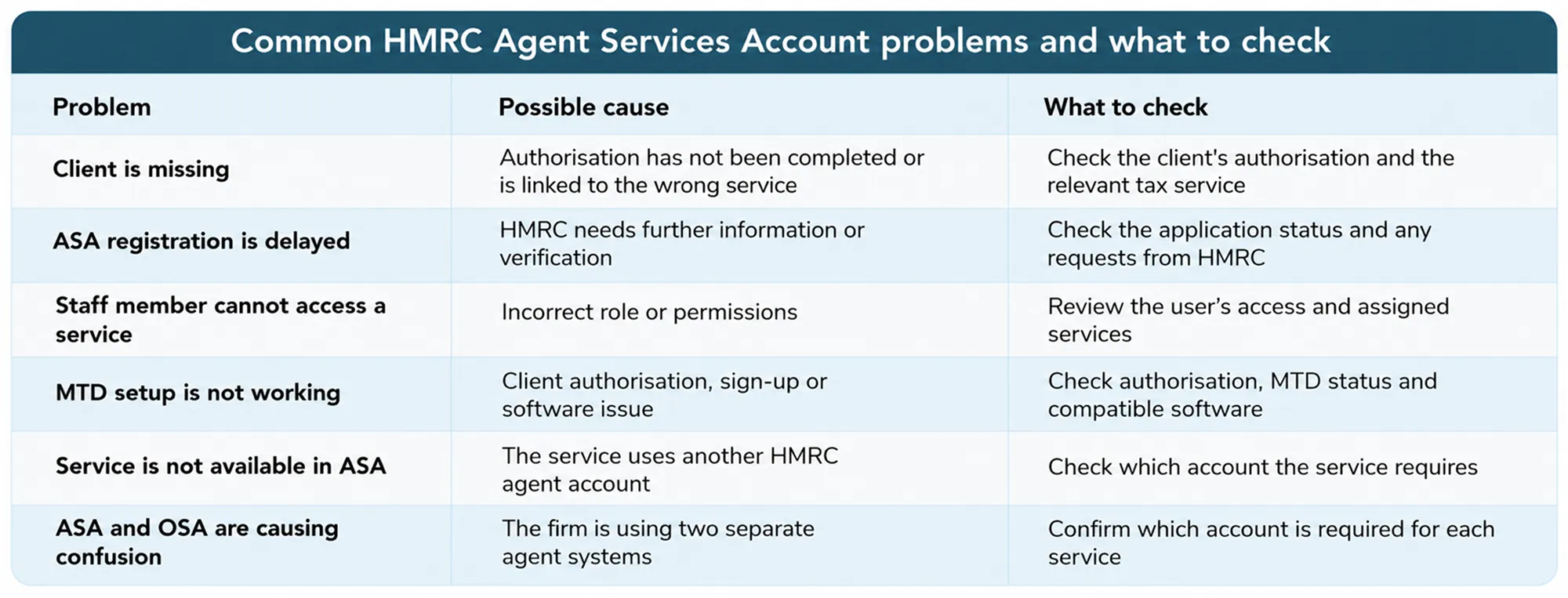
The key is to look at the whole setup rather than assuming that the account itself is the problem.
What HMRC Research Says About Agent Account Challenges
HMRC research provides useful evidence of the challenges tax professionals can face when working across different agent systems.
Among the 873 tax agents surveyed, 75% used both ASA and Online Services for Agents. At the same time, 36% said that having separate accounts with different login details had a high negative impact on their ability to deal with clients.
Other problems were also reported. Thirty-five per cent said limited visibility of VAT returns and payments had a high negative impact, while 33% reported that differences between the information available to agents and clients caused a high negative impact.
These findings point to an important lesson: having an ASA is not enough on its own.
A firm also needs the right account access, client authorisations and staff permissions to work together. When these pieces are properly aligned, accountants can spend less time dealing with access problems and more time supporting their clients.
For accounting firms, understanding HMRC’s systems is therefore about more than knowing which account to log into. It is about building a setup where the right people can access the right services at the right time.
Keep Your HMRC Setup Working Smoothly
An HMRC Agent Services Account is an important part of managing digital tax services, but setting up ASA is only the beginning.
Your firm also needs to understand when OSA is required and make sure client authorisations, staff access and MTD software remain properly aligned.
Taking time to review these areas regularly can help you find access problems before they disrupt client work or create unnecessary delays. If something does not seem right, review your HMRC accounts, authorisations and permissions together rather than looking at only one part of the system.
Get Your HMRC Setup Back on Track
FAQs
Recent Posts